
Introduction
In November 2024, I picked up a brand new MacBook Air M3 — 16GB RAM, 512GB SSD — for about $1,600 here in Manila. It became my daily driver almost immediately, and for over a year it did exactly what I needed it to do: fast, quiet, no drama.
Then, around February 2026, roughly a year and three months in, the keyboard started doing something I hadn't seen before. The built-in j key began bursting on its own — repeatedly, unpredictably, across whatever app I had open. Not a typing habit. Not a shortcut gone wrong. This looked and behaved like contact chatter inside the key switch itself: a hardware fault wearing a software disguise.
This post walks through how I diagnosed it, why the obvious fixes didn't hold, and the event-tap suppressor I ended up building to make the machine usable again.
The Failure Mode
The symptom itself was simple to describe, even if it was a pain to live with:
- Random bursts of
j, with no key press behind them - Affected any active application — browser, terminal, password manager, didn't matter
- Fired even when my hands were nowhere near the keyboard
- Made password fields and normal typing genuinely unreliable
Intermittent, yes — but frequent enough that it broke the flow of normal work. You can't really trust a machine that occasionally decides to inject characters into whatever you're doing.
First Diagnosis: It's the Hardware
I brought it to an official Apple service center in Manila, and their read matched what I was seeing: the keyboard hardware itself was failing and needed replacement. The catch was timing — the machine had just rolled past its AppleCare coverage window, so this was now an out-of-pocket repair. The quote came in around $650 USD at current value.
That's a meaningful chunk of the laptop's original price for a keyboard swap, so before committing to that, I wanted to see if I could buy myself time with a software-side mitigation.
Since the pace AI tooling has been evolving lately is honestly tremendous, last weekend I decided to actually put it to work here instead of just reading about it. I had no plan to hand over $650 for a keyboard replacement if there was any way around it, so I leaned on OpenCode as my harness, running on GPT-5.4 mini, with my existing Superpowers skill set already wired in. The goal was simple: see if AI-assisted diagnosis and remediation could get me an OS-level fix instead of a hardware repair bill. I'm genuinely happy with where it landed — the AI-assisted workflow got the problem solved at the OS level, and that's the setup I'm sticking with.
Ruling Out the Easy Workaround
The obvious first test: plug in an external Bluetooth keyboard and see if the problem follows me or stays with the machine.
The bursts didn't go away. That one test told me a lot — the fault was rooted in the built-in keyboard's input path, not in any particular app, browser, or password manager reacting badly to something. Which also meant a real fix would need to suppress the bad input source specifically, without breaking typing from any other device I plugged in.
Framing It as an Input-Filtering Problem
The tempting-but-wrong move here is to patch around the symptom in whatever app is annoying you most — disable j in the password manager, tweak browser shortcuts, and so on. That doesn't scale, and it leaves every other app still exposed.
The better boundary is the OS input layer itself: intercept the bad key event before it's delivered to any application, and let everything downstream stay untouched. That's the direction the fix ended up taking.
How I Got There: Three Attempts
1. hidutil remap — the cosmetic fix
The first thing I tried was remapping the failing j key using hidutil at the system input layer. It's attractive because it's built-in — no custom binary, no accessibility permission prompts. But on this macOS version it turned out to be fragile, and it behaved more like a cosmetic mask than a real fix. It didn't hold up reliably against the burst pattern.
2. Event-tap suppressor — the real fix
Next I built a small Swift utility, j-suppressor, that sits higher in the input stack. It uses a macOS session-level event tap (CGEvent.tapCreate) to intercept keyboard events before they reach any application. The design goals were straightforward:
- Block the built-in hardware
jbursts - Keep virtual/external keyboard input fully usable
- Avoid app-specific patching entirely
This was the first version that gave consistent, reliable suppression instead of a masking trick.
3. The auto-pause misstep
An early rebuild tried to be "smarter" by pausing suppression whenever an external keyboard was detected, on the theory that this would avoid interfering with legitimate external input. Reasonable in theory — except it introduced a real regression: the moment any external keyboard was connected, the built-in j bursts could leak straight through again. Global auto-pause was too blunt an instrument.
4. The rebuild that stuck
The fix was to drop the global auto-pause logic entirely and instead filter by event source at the point of interception — distinguishing hardware HID events from everything else, rather than reacting to whether some other keyboard happened to be plugged in. That kept the guardrail focused on the actual failing key without touching the rest of the typing workflow.
How the Suppressor Actually Works
The core trick is in how macOS tags where an event came from. Every CGEvent carries an eventSourceStateID. Hardware keyboard input on this machine consistently shows up as CGEventSourceStateID.hidSystemState, while events coming from the virtual/Accessibility keyboard don't. That distinction is what lets the tap block only the physically broken key, and let every other input path through untouched:
func isHardwareKeyboardEvent(_ event: CGEvent) -> Bool {
  event.getIntegerValueField(.eventSourceStateID) == CGEventSourceStateID.hidSystemState.rawValue
}
When a keyDown or keyUp for keycode 38 (j) comes in from the hardware source, the tap swallows it and logs a blocked j line. Anything else passes straight through as Unmanaged.passUnretained(event) — no delay, no side effects on the rest of the keyboard.
Here's the full working source:
// file location:/Users/m3/system-tweaks/j-suppressor.swift | Binary:/Users/m3/.local/bin/j-suppressor
import ApplicationServices
import CoreGraphics
import Foundation
import IOKit
import IOKit.hid

let logURL = FileManager.default.homeDirectoryForCurrentUser
  .appendingPathComponent(".local/share/j-suppressor.log")
try? FileManager.default.createDirectory(at: logURL.deletingLastPathComponent(), withIntermediateDirectories: true)

func log(_ s: String) {
  let line = "\(ISO8601DateFormatter().string(from: Date())) \(s)\n"
  if let data = line.data(using: .utf8) {
    if FileManager.default.fileExists(atPath: logURL.path),
       let fh = try? FileHandle(forWritingTo: logURL) {
      _ = try? fh.seekToEnd()
      try? fh.write(contentsOf: data)
      try? fh.close()
    } else {
      try? data.write(to: logURL)
    }
  }
}

let targetKeyCode: CGKeyCode = 38 // j

// Built-in hardware stays blocked. On this machine, hardware `j` events all
// arrive from the HID system state, while virtual keyboard events do not.
func isHardwareKeyboardEvent(_ event: CGEvent) -> Bool {
  event.getIntegerValueField(.eventSourceStateID) == CGEventSourceStateID.hidSystemState.rawValue
}

let mask = CGEventMask(1 << CGEventType.keyDown.rawValue) |
           CGEventMask(1 << CGEventType.keyUp.rawValue)

let tap = CGEvent.tapCreate(tap: .cgSessionEventTap,
                            place: .headInsertEventTap,
                            options: .defaultTap,
                            eventsOfInterest: mask,
                            callback: { _, type, event, _ in
  let keyCode = event.getIntegerValueField(.keyboardEventKeycode)
  if keyCode == Int64(targetKeyCode) {
    let keyboardType = event.getIntegerValueField(.keyboardEventKeyboardType)
    let stateID = event.getIntegerValueField(.eventSourceStateID)
    if isHardwareKeyboardEvent(event) {
      if type == .keyDown {
        log("blocked j (built-in type=\(keyboardType) state=\(stateID))")
      }
      return nil
    }
    if type == .keyDown {
      log("allowed j (non-built-in type=\(keyboardType) state=\(stateID))")
    }
  }
  return Unmanaged.passUnretained(event)
},
                            userInfo: nil)

guard let tap else {
  log("failed to create event tap")
  exit(1)
}

let runLoop = CFRunLoopGetCurrent()
let tapSource = CFMachPortCreateRunLoopSource(kCFAllocatorDefault, tap, 0)
CFRunLoopAddSource(runLoop, tapSource, .commonModes)
CGEvent.tapEnable(tap: tap, enable: true)

log("started")
CFRunLoopRun()
It also does basic log hygiene — rotating the debug log so it doesn't grow without bound while running for weeks at a time.
Running It as a LaunchAgent
A mitigation you have to remember to launch manually isn't much of a mitigation. I wired j-suppressor up as a LaunchAgent so it starts automatically at login and just stays running in the background, the same way you'd expect any real input-layer protection to behave.
The Manual Fallback: Accessibility Keyboard
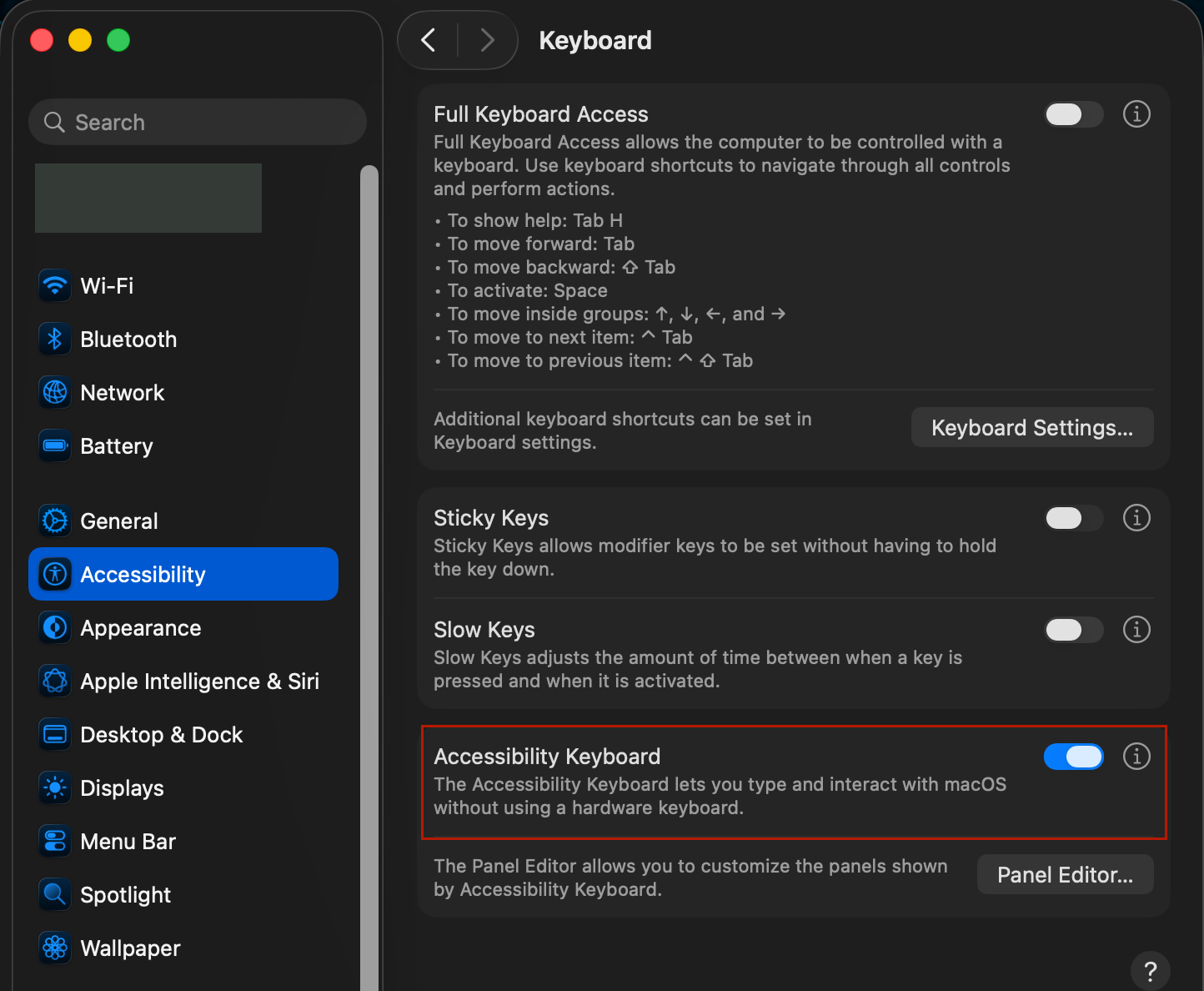
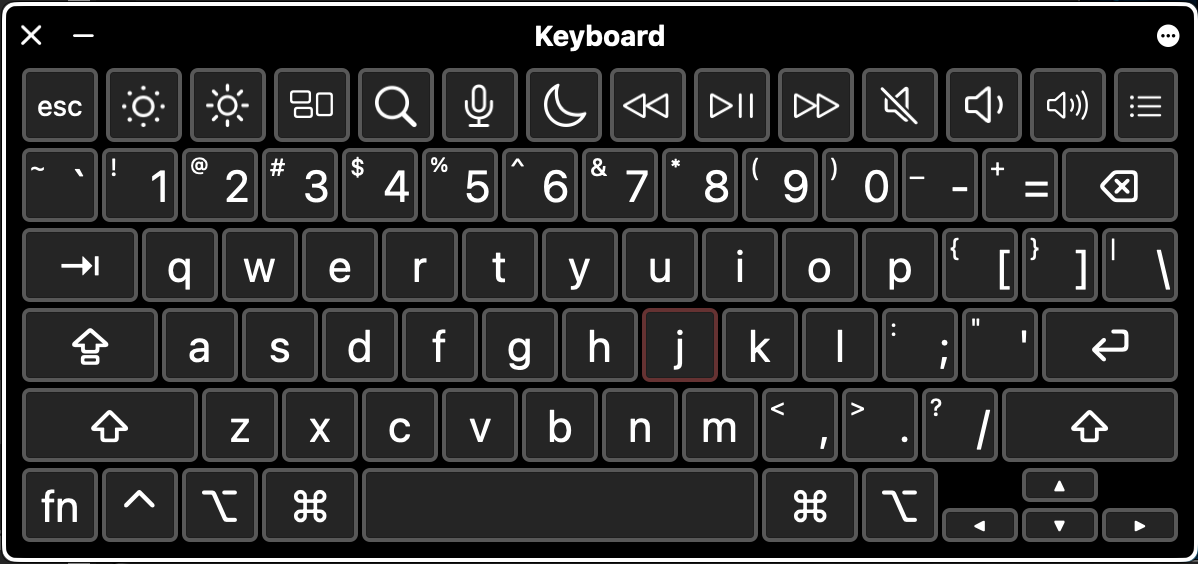
macOS ships with a built-in virtual keyboard that turned out to be a handy escape hatch for the rare moments I actually need to type a j on purpose. It's under:
Settings → Accessibility → Keyboard → Accessibility Keyboard → toggle On
When the physical key would normally be the one doing the work, I tap it on the virtual keyboard instead — it's treated as a non-hardware source, so it sails right past the tap.
Verifying the Fix
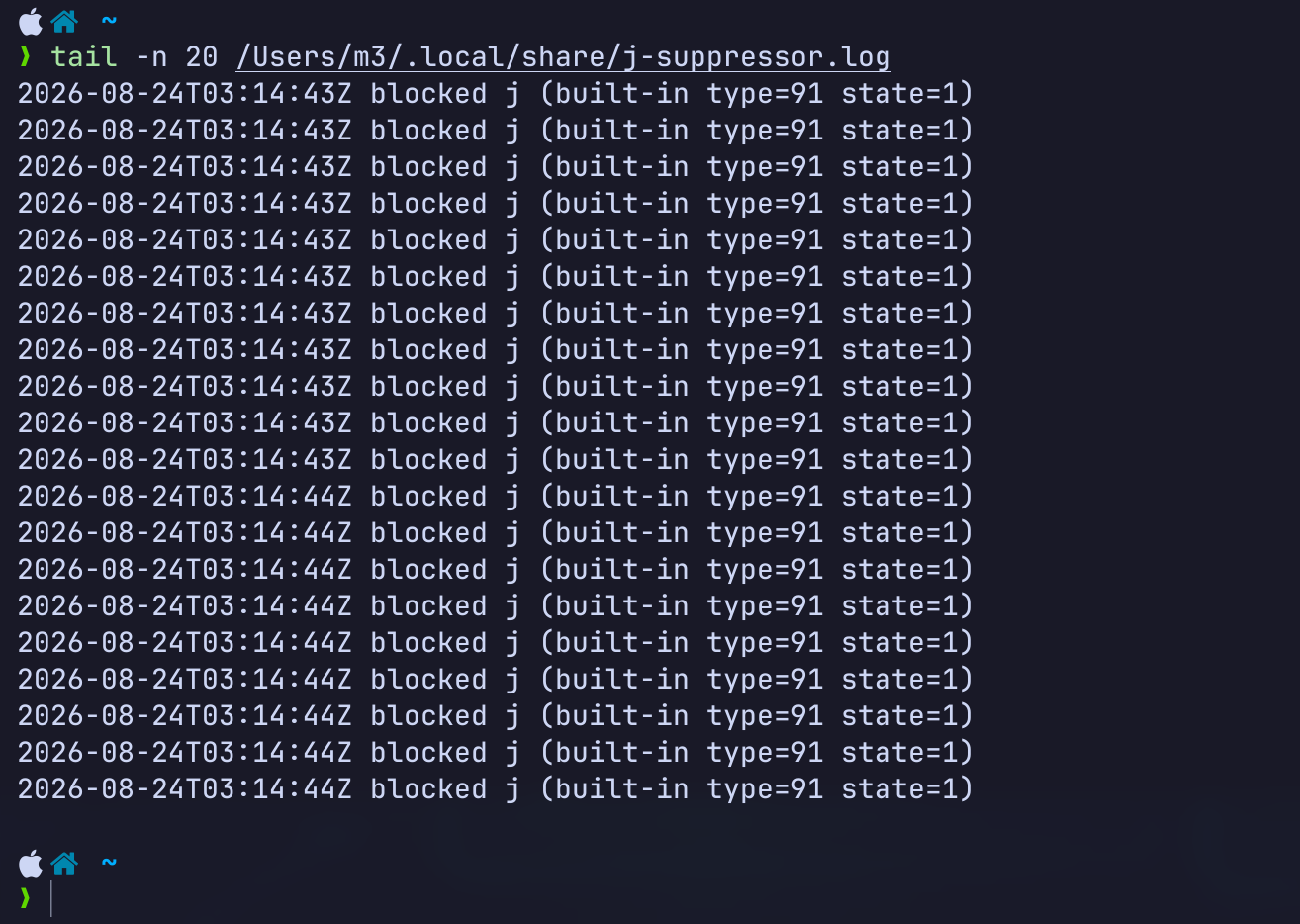
I didn't just trust that it was working — I checked. Two things confirmed it:
- The
j-suppressorprocess actually running underlaunchd - Fresh
blocked j (built-in ...)entries appearing in the log every time the fault fired
Seeing those log lines land in real time, matched to the moments the key was misbehaving, was the actual proof that the tap was intercepting the right source.
Where This Leaves Me
The keyboard is still physically damaged — this is a mitigation, not a repair. But the practical outcome is better than I expected when the bursts first showed up:
- Built-in
jbursts are suppressed at the source - Protection starts automatically, no manual step required
- Logs stay bounded instead of growing forever
- The fix is entirely local — no browser extension, no per-app patch, no dependency on what's in front
Lessons Learned
- Hardware failures can absolutely masquerade as software bugs — don't rule out a physical cause just because the symptom "looks" logical.
- Plugging in an external keyboard doesn't automatically isolate a failing internal one; test that assumption before you build anything.
- Event-level filtering, right at the OS input layer, is usually the correct boundary for this kind of remediation — not app-by-app patching.
- AI tooling was genuinely useful here as an engineering accelerator: narrowing the diagnosis, iterating on the event-source filtering logic, and keeping each version testable before trusting it as a daily driver. In this case that meant OpenCode as the harness, GPT-5.4 mini as the model, and my existing Superpowers skill set doing the heavy lifting.
The keyboard is still broken. The workstation, at least, is usable again.