If you've been following along since my last OpenCode post, you know I've been running it as my daily driver for a while now — straight from the terminal on my Debian box. No OpenCode Desktop, no GUI wrapper, just me, a terminal window, and whatever project I'm neck-deep in that day. It's the same "keep it lean, keep it scriptable" philosophy I apply to the VPS stack, just pointed at my daily workflow instead of my infrastructure.
Last time around, I went deep on OpenCode's data retention story — what "zero data retention" actually covers and where it quietly stops covering you. This post is the practical follow-up: now that I trust what OpenCode does with my data, let's talk about how much it costs me to use it.
Because here's the thing nobody warns you about when you start living in the terminal with an AI agent: the token meter doesn't stop running just because you're comfortable. And if you're anything like me, "comfortable" quietly turns into "why did I burn 40,000 tokens asking it to rename a variable."
The good news is you don't need a third-party dashboard or a bag of prompt-engineering tricks to fix this. OpenCode ships with the controls already built in — you just have to know they exist and flip the right switches. Here's what I found, in plain terms, with the actual defaults verified against the current release.
1. opencode stats — Find Out Where Your Tokens Actually Went
Before you touch a single setting, look at the data. Guessing at what's expensive is how you end up "optimizing" the one thing that was never the problem.
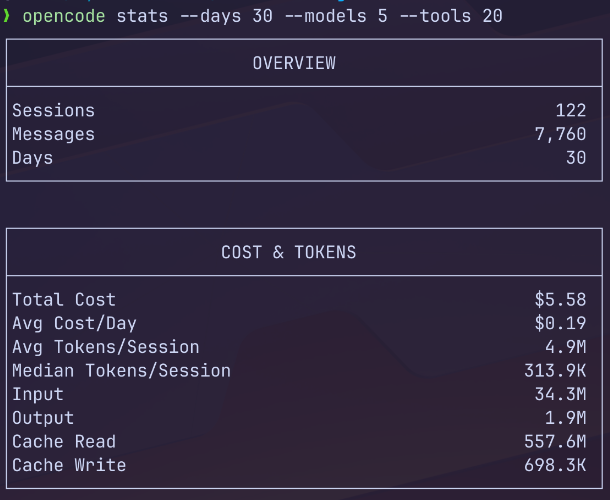
opencode stats --days 30 --models 5 --tools 20
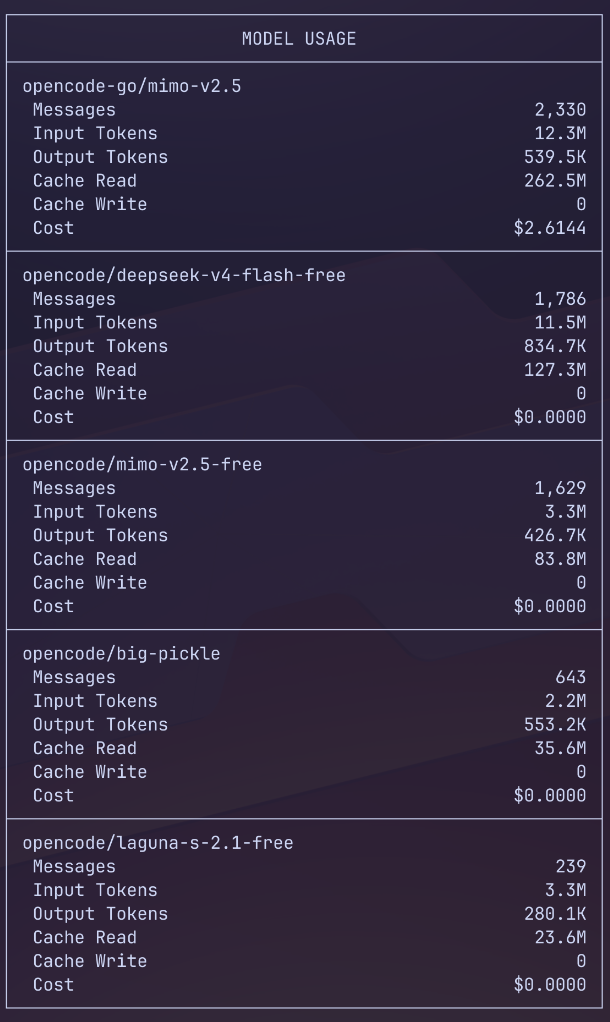
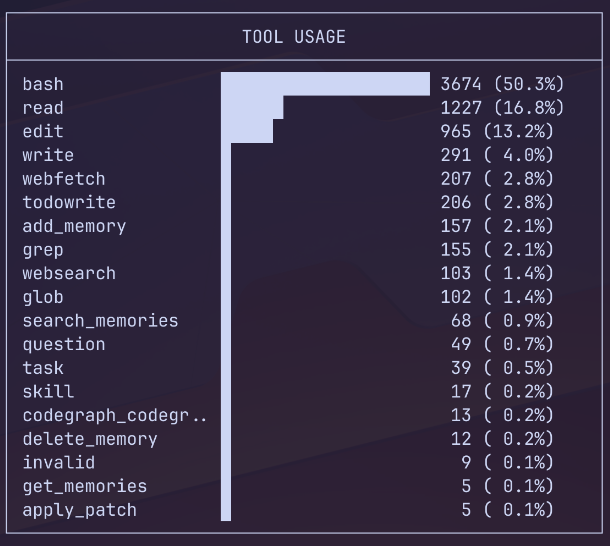
In plain English: this is your phone bill, but for AI usage. It breaks down which sessions, which models, and which tools chewed through the most tokens over whatever window you give it (--days), and lets you filter down to specific models, projects, or tool calls. Run it before you change anything. Run it again after, so you actually know your changes worked instead of just assuming they did.
Version note: OpenCode 1.18.18 was current at the time of this post. The sample output below is from my local machine, covering the last 30 days.
2. The plan Agent — Look, Don't Touch
By default, OpenCode drops you into the build agent. Build has full write access — it can edit files, run shell commands, the works. That's exactly what you want when you're actually implementing something. It's total overkill when you're just poking around a codebase trying to figure out where a bug lives.
For that kind of read-only exploration, switch to plan. It's a built-in agent that can read and reason but can't touch your files — no edits, no commands executed. Because it isn't holding all that write-tooling context in its head, it runs leaner and burns fewer tokens per exchange.
In plain English: think of build as handing someone a screwdriver and the keys to your server, and plan as handing them a flashlight and telling them to look but not touch. When you just need eyes on the problem, don't hand out the screwdriver.
You can make plan your default so you have to consciously opt into write access:
{
  "default_agent": "plan"
}
I've started doing this on any repo where I'm still mapping out what's actually broken. It also has a nice side effect: it forces me to actually understand the problem before I let the agent start changing things, which has saved me from a few "confidently wrong" edits.
3. Automatic Context Compaction — Already On, Leave It Alone
OpenCode automatically prunes old conversation history before your context window fills up. This is on by default (compaction.auto defaults to true), and there's really no good reason to turn it off.
In plain English: compaction is like your terminal's scrollback buffer quietly summarizing the boring parts of a long session so it doesn't have to re-read the whole thing every time you type something. Without it, every message drags the entire conversation history along for the ride — more tokens spent per turn, no upside.
The only time I'd touch OPENCODE_DISABLE_AUTOCOMPACT is if I were actively debugging a case where the agent seemed to be forgetting something important mid-session. Otherwise, leave it be.
Pruning — the setting nobody turns on, and should
Separate from compaction, OpenCode can also prune: walk backward through the conversation and discard the actual output of old, already-completed tool calls (it protects roughly the most recent 40k tokens, so recent context stays intact). This one is off by default — compaction.prune defaults to false — and it's genuinely the easiest win in this whole list.
In plain English: if compaction is summarizing the boring parts of the conversation, pruning is throwing out the receipts from errands you already finished. That 800-line cat output from ten tool calls ago isn't doing anything for you anymore — it's just sitting there, costing you tokens every time the model has to reprocess it.
4. Output Caps — A Ceiling on How Much It Writes Back
Since input tokens tend to dominate usage — often by a wide margin — the model's output usually isn't your biggest cost driver. But if you want a hard ceiling anyway, you can set one:
OPENCODE_EXPERIMENTAL_OUTPUT_TOKEN_MAX=16000
The default is 32,000 tokens per response (technically min(model limit, 32000)). Lower it if you want to force the agent to be terser. Raise it toward 64,000 if you're running something like Claude Sonnet 4.5+, GPT-5.x, or Gemini 3 and actually need long-form output — big refactors, generated docs, that kind of thing.
In plain English: this is the "keep it under 500 words" instruction you'd give a long-winded coworker, except it's enforced rather than politely ignored. For most day-to-day work, the default is fine — don't touch it unless you have a specific reason to.
What the Defaults Actually Are
Here's the state of things on a stock install, verified against the current OpenCode release:
| Lever | Default | Recommended |
|---|---|---|
opencode stats |
— | Run it first |
| Default agent | build |
plan for read-only work |
compaction.auto |
true (on) |
Keep on |
compaction.prune |
false (off) |
Turn on |
| Output cap | 32,000 tokens | Keep, unless you need long outputs |
The Setup I'm Running
If you only make one change after reading this, make it pruning — it's the only default sitting on real, unused savings. Everything else is already tuned sensibly out of the box.
{
  "$schema": "https://opencode.ai/config.json",
  "compaction": {
    "auto": true,
    "prune": true
  }
}
That's it. Auto-compaction stays safe, and pruning quietly trims the biggest sink — stale tool output that's just taking up space in context.
How to Implement It
OpenCode config lives in opencode.json or opencode.jsonc. The exact path depends on your OS:
| OS | Global config |
|---|---|
| macOS / Linux | ~/.config/opencode/opencode.json (or opencode.jsonc) |
| Windows | %USERPROFILE%\.config\opencode\opencode.json |
Step 1 — Edit the global config (~/.config/opencode/opencode.jsonc):
{
  "$schema": "https://opencode.ai/config.json",
  "default_agent": "plan",
  "compaction": {
    "auto": true,
    "prune": true
  }
}
default_agent: "plan"makes the lean, read-onlyplanagent the default. If it's ever invalid, OpenCode falls back tobuildsilently.compaction.auto: trueis already the default, so it's explicit rather than required.compaction.prune: trueis the key token saver — it discards old tool outputs.
Step 2 — (Optional) Cap output per response. This one is not a config key — it's an environment variable, so it goes in your shell profile instead:
# ~/.zshrc (zsh)  or  ~/.bashrc (bash)
export OPENCODE_EXPERIMENTAL_OUTPUT_TOKEN_MAX=16000
Then reload: source ~/.zshrc. Set it to 64000 if you use long-output models (Claude Sonnet 4.5+, GPT-5.x, Gemini 3); omit it entirely to keep the 32,000 default.
Step 3 — Restart OpenCode and verify:
opencode debug configCheck that default_agent, compaction, and (if set) the output cap all show up in the resolved config.
Note on multiple configs: OpenCode merges config files, and later sources override earlier ones. Precedence is roughly: remote → global (
~/.config/opencode/) → custom (OPENCODE_CONFIG) → project (opencode.jsonin the repo). If you useOPENCODE_CONFIG(e.g. an "everything harness" config exported in your shell), its settings win over the global file on conflicting keys — but non-conflicting keys likecompactionanddefault_agentmerge fine.
Summary
- Monitor first with
opencode stats— don't guess, measure. - Use the
planagent for anything read-only. - Leave auto-compaction on; only disable it if you're actively debugging memory/context issues.
- Cap output only if you specifically want a hard ceiling.
- Turn on
compaction.prune— the one change I'd recommend to basically everyone running OpenCode day to day. - Drop it in your global config and confirm with
opencode debug config— two minutes, done.
None of this required a third-party tool or a clever prompt trick. It's all sitting in the config file, waiting to be turned on — which, honestly, is my favorite kind of optimization: the kind where the tool already did the hard part, and all I had to do was read the manual.